Hotel Management Operations Guide
Guide
Hotel Management
1. Create Category1. Create Room Category
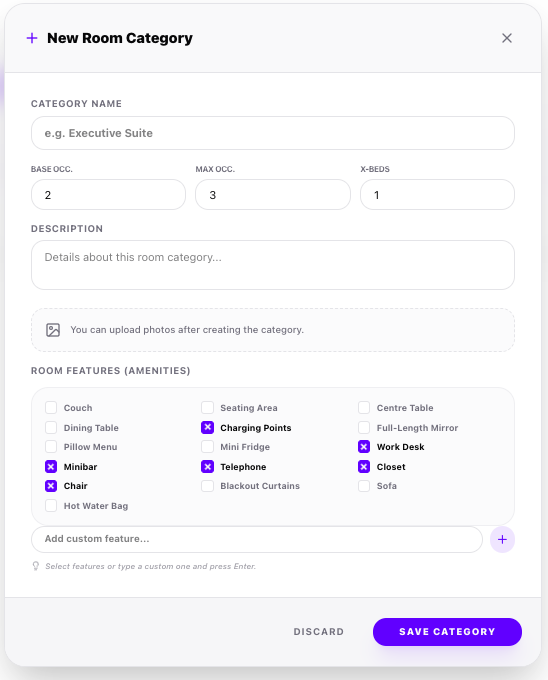
To sell hotel rooms, you must first define your Room Category. A category groups rooms of similar types (e.g. Executive Suite) and defines occupancy levels, descriptions, and amenities—allowing you to pick from pre-populated features or create custom ones.
💡 System Location / UI ActionUnder your site, go to Hotel Management → Rooms → Click '+ Add Category'
🔍 Click to Zoom
Execution Steps
1
Click the '+ Add Category' button to launch the 'New Room Category' form modal.2
Fill in the Category Name (e.g., Executive Suite), Base Occupancy, Max Occupancy, and Extra Beds limit (X-Beds).3
Review the Room Area (Sq Ft) input field: it defaults to 200 sq. ft., but you can customize it as needed. All physical rooms mapped to this category will inherit this default size.4
Input a descriptive summary of the room class in the Description text area.5
Select room amenities (features) by choosing from the pre-populated catalog (like Couch, Work Desk, Mini Fridge, Minibar, Sofa), or type your own in the 'Add custom feature...' box and press Enter.6
Click 'Save Category' to commit. Note: Room photos are uploaded and rate pricing plans are configured after the category is successfully created.🌐 Visibility NoteRoom features (amenities) will be visible to your customers.