How Role-Based Access and Quick PINs Keep Your Front Desk Secure and Fast
Antena separates who can log into your dashboard from who can work a shift on the floor — here is why that split matters, and how Quick PINs make shift handoffs fast without weakening security.
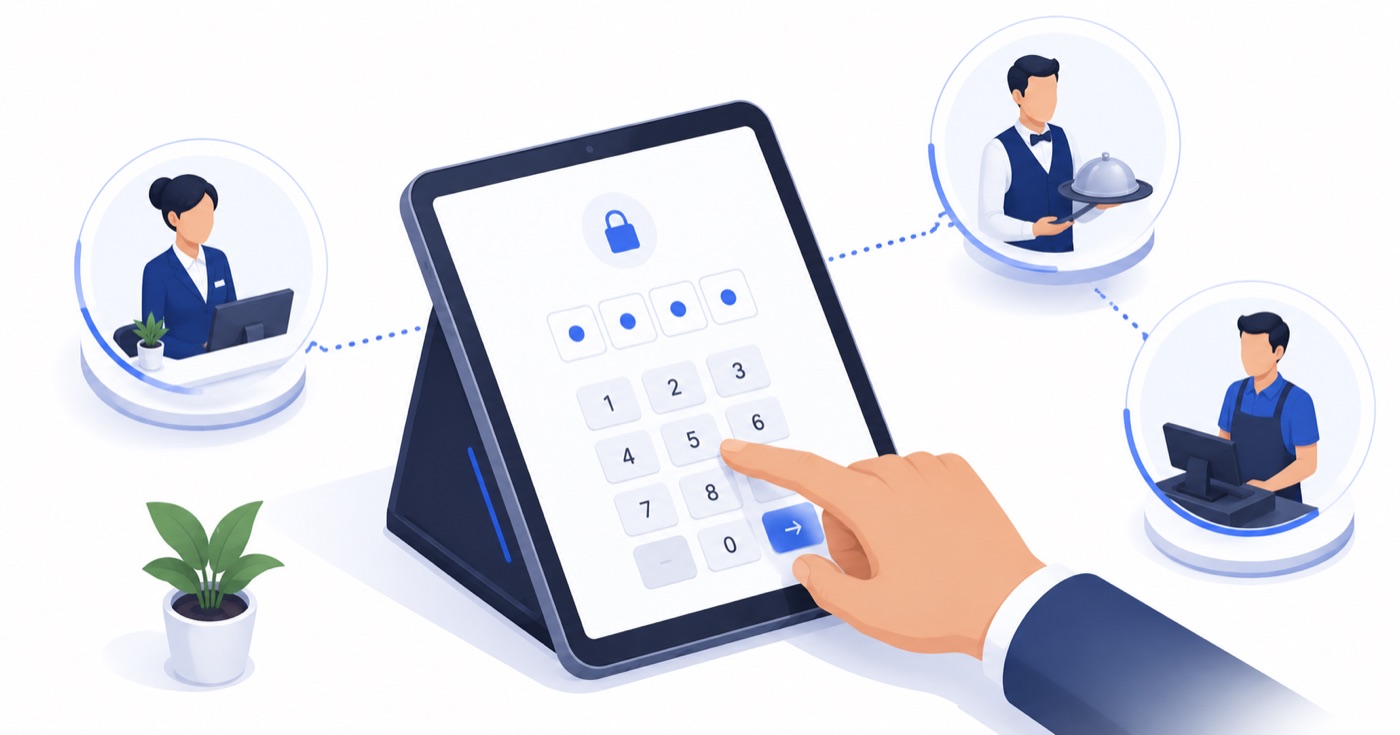
Table of Contents
The Hidden Security & Operational Risk of Shared Front-Desk Accounts
Walk into almost any independent hotel, resort, or multi-outlet restaurant, and you will observe a subtle but pervasive security threat: **a single master administrator login shared across every front-desk terminal, point-of-sale (POS) screen, and tablet**.
Everyone on duty—from the morning front-desk manager and afternoon receptionist to night auditors and bell captains—uses the exact same browser tab or application login password. It feels convenient during busy check-in hours, but it introduces an acute operational vulnerability.
Consider what happens when an anomaly occurs:
When management reviews the system logs, every single event is attributed to the generic account name *"FrontDeskAdmin"*. You know an unauthorized action took place, but you have zero mathematical or operational proof of **who performed it**.
```
[Shared Master Password Model - Vulnerable]
Front Desk PC ──┐
POS Terminal ──┼──> Single "Admin" Account ──> Zero Attribution for Discrepancies
Handheld Tablet ──┘
[Role-Based + Quick PIN Model - Secure]
Back-Office Dashboard ──> Owner / Manager (Named OAuth Login)
Shared Floor Terminals ──> 4-Digit Quick PIN (Instant Switch per Action & Full Audit Trail)
```
Fixing this does not require forcing room attendants or busy receptionists to type complex 16-character passwords every time they touch a screen. The solution lies in architecturally separating **System Account Access** from **On-Floor Shift Identity**.
---
Two Distinct Questions: Account Access vs. Floor Identity
To build a secure yet fast operational environment, hospitality platforms must separate access control into two distinct layers:
1. Back-Office Account Access (Administrative Level)
This answers the question: *Who is authorized to access executive business intelligence, modify room tariffs, edit tax schemas, and pull bank transfer reports?*
2. On-Floor Shift Identity (Terminal Level)
This answers the question: *Who is operating this specific terminal during this exact 10-second transaction?*
---
Matrix: Recommended Role-Based Access Control (RBAC) in Hospitality
Defining granular permissions prevents unauthorized modifications while giving floor staff exactly what they need to execute their shifts seamlessly.
| Role Title | Dashboard Access | Shift PIN Access | Key Permissions | Restricted Actions |
| :--- | :--- | :--- | :--- | :--- |
| **Property Owner / GM** | Full Admin | Yes (Override PIN) | Full financial reports, tariff changes, staff creation, tax setup | None |
| **Front Desk Manager** | Limited Admin | Yes | Check-in/out, rate overrides up to 15%, folio split, room assignment | System config, user deletion |
| **Receptionist / Desk Agent** | None | Yes | Standard check-in/out, cash posting, guest profile creation | Tariff editing, manual rate overrides |
| **Restaurant Cashier** | None | Yes | KOT generation, table settlement, discount application (max 10%) | Voiding settled bills without manager PIN |
| **Housekeeping Attendant** | Mobile App Only | Yes (4-Digit PIN) | Room status flip (VD to VC), maintenance fault reporting | Guest folio access, rate details |
| **Night Auditor** | Limited Admin | Yes | Day-end ledger close, midnight room posting, audit export | Owner payout details |
---
The Operational Mechanics of 4-Digit Quick PINs
Quick PINs are designed for lightning-fast context switching during peak operational rushes. Here is how the sequence operates on a shared front-desk or POS terminal:
Step 1: Active Terminal Stationing
The front-desk PC or POS tablet remains authenticated in "Floor Station Mode." The screen displays a lightweight PIN entry keypad.
Step 2: Instant PIN Switch (< 2 Seconds)
When Receptionist Rahul steps up to check in a guest, he taps his personal 4-digit PIN (e.g., `4821`). The interface instantly unlocks into Rahul’s scoped environment, displaying his name in the top corner.
Step 3: Transaction Execution & Audit Logging
Rahul completes the check-in and collects ₹3,000 via UPI. The system writes an immutable audit record:
`[2026-09-26 14:32:01] EVENT: GUEST_CHECKIN | ROOM: 204 | AGENT: Rahul Sharma (PIN: 4821) | AMOUNT: ₹3,000`
Step 4: Automated Idle Timeout (15–30 Seconds)
Once the check-in is finalized, if no screen interaction occurs for 30 seconds, the screen automatically locks back to the PIN keypad. When Receptionist Ananya steps up 10 seconds later, she enters her PIN (`9102`), switching the context immediately without logging out of the underlying station.
---
Financial & Audit Trail Benefits
---
Frequently Asked Questions (FAQ)
Q1: What happens if an employee forgets their 4-digit Quick PIN during a busy check-in rush?
A manager or property owner logged into the main dashboard can reset an employee's Quick PIN in under 5 seconds from the Staff Management panel. The new PIN takes effect instantly on all property devices over local Wi-Fi or cloud sync.
Q2: Can a Quick PIN be used to access the back-office financial dashboard remotely?
No. Quick PINs are strictly scoped to device-local floor stations and mobile staff apps. Accessing the executive dashboard from a home laptop or remote phone requires a full email-based account login with multi-factor authentication.
Q3: How does the system handle manager overrides for high-value voids or refunds?
When a receptionist or cashier attempts an action that exceeds their role threshold (e.g., voiding a paid ₹2,000 restaurant bill or offering a ₹1,000 room discount), the app pops up a "Manager Approval Required" modal. A shift manager steps over, enters their 4-digit Manager PIN directly on the screen, and the transaction is authorized and logged with dual-signature audit trail.
About Priyanka Singh
Founder
Priyanka is a founder of Antena. She combines a technical background with a close interest in how independent hotels and restaurants actually run day to day. She focuses on turning recurring operational headaches — attendance, stock control, room turns — into workflows that hold up during a busy shift, and writes about the practical, floor-level side of making that happen.
Related Articles
Setting Up Shift and Leave Policies Your Staff Actually Understand
Working hours, overtime rules, leave quotas, holidays, and geo-fenced clock-ins — configured once as a policy, then applied consistently across your whole team.
Hotel Room Status Codes Every Front Desk Should Know
VC, VD, OOO, DND — the short codes that pass a room between housekeeping and the front desk. Here is what each one means and why getting them right protects your revenue.
How Front-Desk Upselling Works (Without Being Pushy)
Check-in is the most underused revenue moment in an independent hotel. Done well, upselling raises revenue and guest satisfaction at the same time — here is how.